Everything I Learned Building an Independent Map Server
A field report on self-hosting OpenStreetMap tiles: navigating the ecosystem of formats, tools, and CDN strategies to build an independent map server — with costs, failures, and practical recommendations.
2026-04-02

When OpenTopoMap announced it would downsize in early 2026, I knew the maps in my SaaS product would start degrading. Tiles above zoom level 14 would be gone. I could switch to another free provider — and wait for it to shut down — or I could own the stack.
💪 I chose to own it. What followed was an in-depth exploration of the OpenStreetMap ecosystem, where I learned that self-hosting maps is entirely possible, surprisingly affordable, and unnecessarily confusing.
I ended up with an easy-to-set-up map server and a more nuanced view of the chaos that surrounds the topic.
Here's a field report — what worked, what didn't, what it costs, and how I dream of a world where maps are abundant, free, and beautiful ❤️.
You Don't Just Self-Host Maps
Well, actually you do, but I'm getting ahead of myself.
It all started when the Earth was young, the summers warm, and OpenTopoMap announced it was moving to a smaller server and effectively capping useful tiles at zoom 14. This issue just surfaced two painfully plain and troublesome truths: commercial mapping solutions are expensive, and free providers are exposed to the vagaries of funding, motivation, and interest of the people who make them possible.
However, in a twist of fate, the basic data layer that most commercial providers are using is free! OpenStreetMap is a collaborative project that creates and distributes free geographic data for the world — think Wikipedia, but for maps. Started in 2004, it's now maintained by millions of contributors and powers a vast ecosystem of tools and services. The map data itself is freely available under the Open Data Commons Open Database License, which means anyone can use, share, and build upon it.
The costs of self-hosting are then infrastructure and development alone, and plenty of tools exist to minimise the burden. The question isn't whether self-hosting is possible — it's which of a dozen paths you should take.
Switch2OSM is a fantastic resource to start exploring the ecosystem centered around OpenStreetMap; it exists specifically because "how do I stop paying for maps" is a common enough question to warrant its own website.
Welcome to the (Ecosystem) Jungle
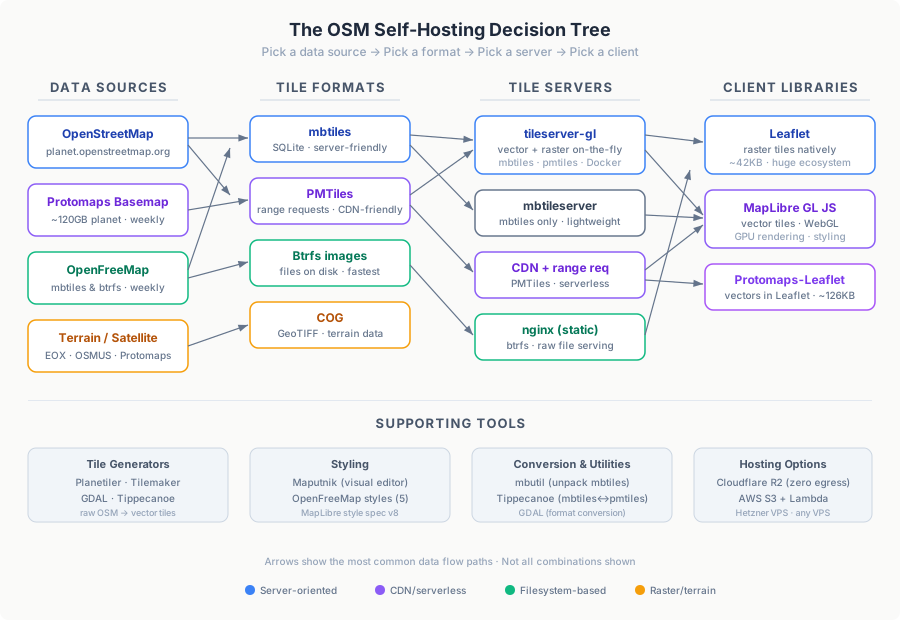
The first thing you'll notice is that the naming is out to get you: no standardisation, multiple agents piggybacking each other's success, re-use abuse.
"Protomaps" is simultaneously a tile format (PMTiles), a basemap, a Leaflet plugin, and a company. "OpenMapTiles" and "OpenFreeMap" and "OpenStreetMap" sound like the same thing but are three different projects. You'll encounter "mbtiles" and "pmtiles" and "pbf" and "mvt" and wonder why there are four formats for what seems like the same thing.
Let me untangle it.
Tile Formats
mbtiles is SQLite in a trench coat. Each tile is a row in a database, packed into a single file. It's the oldest tile-storage format and the most broadly supported — originally designed by Mapbox to bundle map tiles for offline use. Tileserver-gl works with it out of the box.
PMTiles is a cloud-native solution, created by Protomaps. It consists of a single file designed for HTTP range requests — meaning a client can fetch individual tiles by requesting specific byte ranges, no server-side logic needed. This makes it ideal for serving directly from cloud storage (S3, R2, GCS) without running a tile server at all. Trickier to configure with tileserver-gl, but the payoff is serverless deployment.
Btrfs images are OpenFreeMap's approach: each tile is a literal file on a copy-on-write file system. No database overhead, no range-request parsing — a map server can consist of a single nginx serving a static directory. The fastest option for raw serving speed, though it requires mounting the image on a server.
COG (Cloud Optimized GeoTIFF) follows the same philosophy as PMTiles — range-request friendly files — but for raster geodata like satellite imagery and elevation models. Defined by the COG spec, it's more relevant for terrain overlays than base maps.
The Key Tools
Generating tiles: Planetiler is a Java tool that reads raw OpenStreetMap data (the planet .osm.pbf file) and produces vector tiles, typically as mbtiles or PMTiles. It's designed for speed — it can process the entire planet in hours on a single machine. Tilemaker does the same job in C++, with a focus on configurability through Lua scripting — you define which OSM features get included and how they map to tile layers. GDAL (the Geospatial Data Abstraction Library) is the universal Swiss army knife for geospatial format conversion: it can translate between raster formats, reproject coordinate systems, and convert vector data — but its power comes with a steep configuration learning curve.
Serving tiles: Tileserver-gl is the most full-featured open-source option. Built by MapTiler, it serves vector tiles directly and can also rasterize them on the fly into PNG, JPEG, or WebP images using the MapLibre Native renderer — meaning you can store your data once as vectors and serve it as either format. It comes with a built-in web preview, supports multiple styles simultaneously, and runs in Docker. mbtileserver is a Go-based alternative that focuses on one thing: serving mbtiles files efficiently over HTTP. It's much lighter weight — no rasterization, no style rendering — but fast and simple if all you need is to expose vector tiles.
Rendering on the client: Leaflet is the dominant JavaScript library for interactive web maps. It's lightweight (~42KB gzipped), easy to use, and has a massive plugin ecosystem. It handles raster tiles natively but doesn't handle vector tiles out of the box. MapLibre GL JS is the open-source fork of Mapbox GL JS, created after Mapbox changed its license in late 2020. It renders vector tiles on the GPU using WebGL, producing crisp, smoothly-zoomable maps with client-side styling. Protomaps-Leaflet bridges the gap: it's a Leaflet plugin (~126KB, BSD license) that adds vector tile rendering to Leaflet without requiring a full switch to MapLibre.
Styling: Map styles define how raw tile data gets rendered visually — colors, line widths, label placement, icons. Maputnik is an open-source visual editor for creating and modifying styles in the Mapbox/MapLibre style specification format. You load a style, see a live preview, drag sliders, pick colors, and export the resulting JSON. OpenFreeMap provides five ready-made, battle-tested styles — dark, bright, fiord, liberty, and positron — that work directly with tileserver-gl and save you from starting from a blank canvas.
The decision tree is: (1) pick a data source, (2) pick a format, (3) pick a server, (4) pick a client library. Every choice constrains the next.
In a Big Big World - Getting Planet Data

A "planet file" is the entire OpenStreetMap dataset, pre-processed into tiles. You'll need one.
I mean, of course you could just prepare it yourself from raw OpenStreetMap data, but how many lives do you have? Given I'm quite far along my first one, I opted for a ready-to-use package.
Protomaps offers weekly planet builds as PMTiles — approximately 120GB for the whole planet. Also mirrored at data.source.coop/protomaps/openstreetmap/v4.pmtiles.
OpenFreeMap provides the same data as mbtiles and btrfs images, updated weekly. To find the latest mbtiles, grep the file listing for /tiles.mbtiles$.
Download tips: use aria2c (multi-connection) or wget2. Standard wget will take forever for 120GB.
After starting your download, grab a beer, coffee, boeuf bourguignon, go for a walk, learn Aramaic, write a couple of books, and you'll come back to a whole new world sitting on your hard drive.
Mapbox's mbutil can unpack mbtiles into a directory of individual tile files if you need raw access. Tippecanoe — originally a Mapbox tool for creating vector tilesets from GeoJSON — can also convert between mbtiles and PMTiles formats.
The key trade-off: Protomaps PMTiles are CDN-friendly (range requests). OpenFreeMap mbtiles are server-friendly (SQLite queries). Your format choice constrains your serving architecture.
Budget 150–200GB of storage regardless of format. Planet files are large and you'll want room for updates.
The power and flexibility of the open-source and free data comes at the cost of overwhelming complexity; you should know that there are ways but be careful: you don't know how deep the rabbit hole goes until you're in free fall.
Vector or Raster? Choose Your Pain
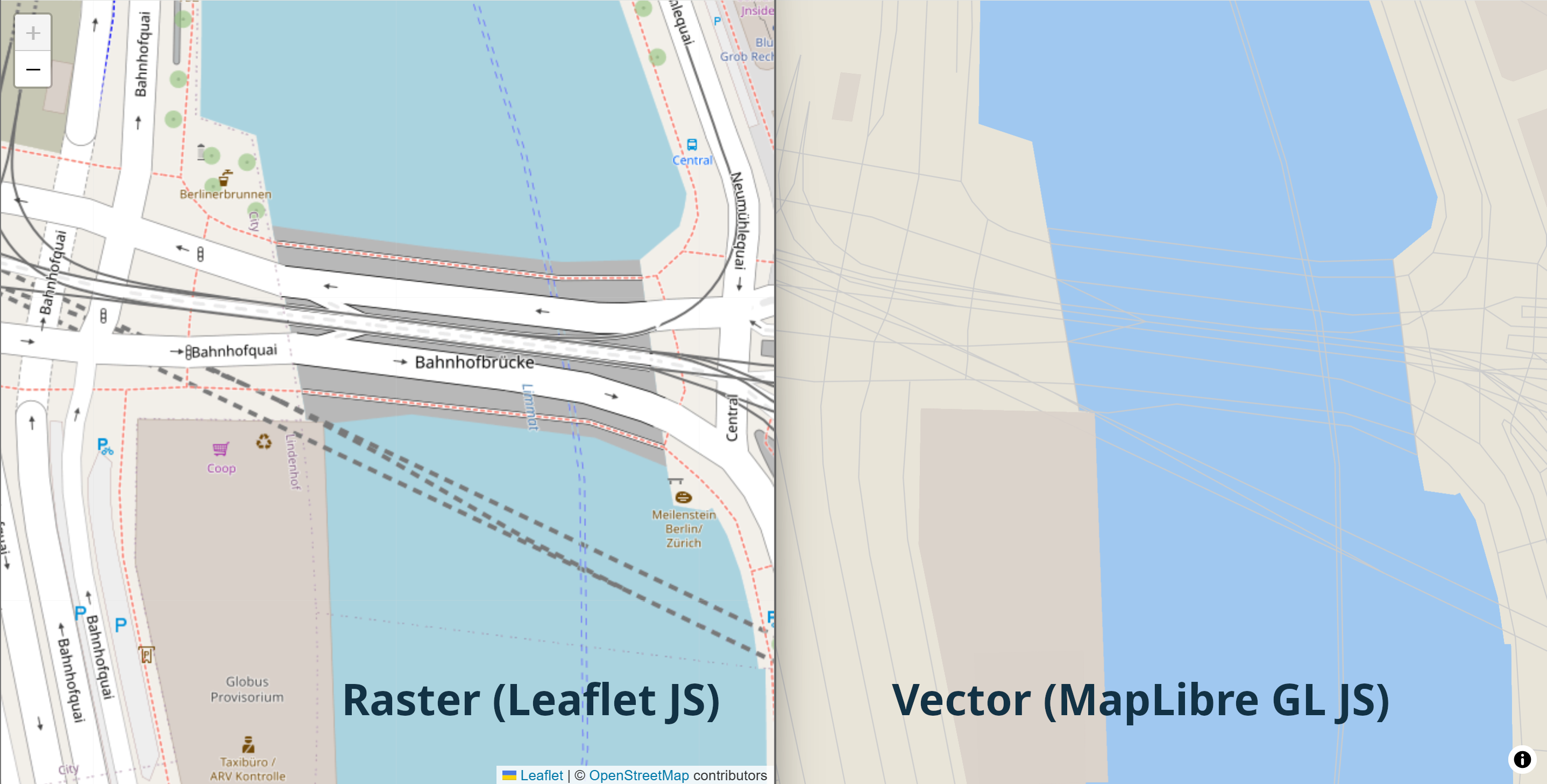
There are really only two approaches to serving maps: Vector and Raster tiles. Each is accompanied by its own private hell of alternative formats, but the concept doesn't change.
Vector tiles transfer raw geometry and attributes. They're styled client-side, meaning smaller transfer sizes but heavier rendering. Formats include .pbf (Protocol Buffers) and .mvt (Mapbox Vector Tiles). A study in ISPRS unsurprisingly confirmed that vector tiles are harder on client CPUs, especially mobile devices.
Raster tiles are pre-rendered images — PNG, JPEG, or WebP. They work everywhere, with any mapping library, with zero client-side rendering cost. The trade-off is larger transfer sizes and server-side rendering overhead.
Selecting one is a decision that cascades through your entire stack.
Using vector tiles with Leaflet requires either protomaps-leaflet (~126KB additional JS) or switching entirely to MapLibre GL JS. For raster tiles, Leaflet works natively with a single line of code:
L.tileLayer('https://your-server/styles/bright/512/{z}/{x}/{y}.webp').addTo(map);Tileserver-gl supports on-the-fly rasterization: store vector tiles, serve raster images. Just change the file extension in the URL — .png, .webp, .jpg all work. The WebP support alone is a practical win: smaller files than PNG with no visible quality loss.
My take: Vector if you need interactive styling or are already invested in MapLibre. Raster if you want maximum compatibility and minimal client overhead. Tileserver-gl's ability to store vector and serve raster offers the best of both worlds — at the cost of server CPU and a slight serving overhead.
The Die is Cast - Tileserver-GL: The Workhorse
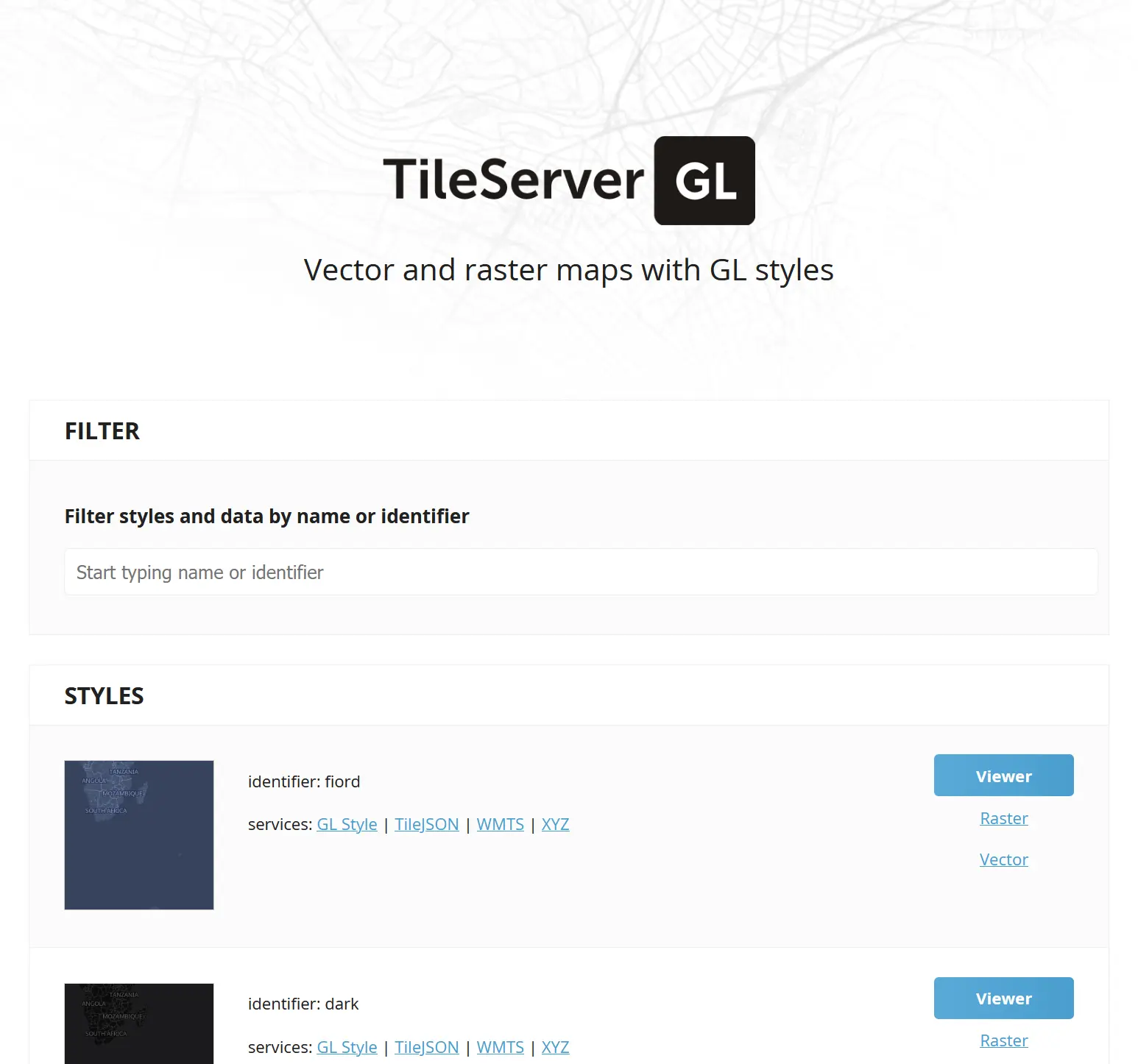
Setting up Tileserver-gl is where I spent far too much of my time. It's a Docker-ready tile server that serves vector tiles and can rasterize them on the fly using any MapLibre-compatible style.
I did encounter a few issues on the way — the wise man learns, the unwise complain. I'm going for both.
mbtiles works out of the box. PMTiles does not. The configuration for mbtiles is straightforward. PMTiles requires more careful setup and I hit multiple silent failures getting it working.
serve_data: false breaks things silently. If you set "serve_data": false in a style configuration, rasterization stops working. No error message. No warning. Just blank tiles. I spent more time than I care to confess on this.
The top Google results are wrong. Searching for "tileserver-gl configuration" returns legacy readthedocs pages that are outdated. The canonical docs are on GitHub.
The fastest way to understand the config is to run it in verbose mode with sample data:
docker run --rm -p 8080:8080 maptiler/tileserver-gl:latest --verboseThis downloads a sample dataset and prints the full configuration. From there, you can modify incrementally.
Tileserver-gl is a complex beast, but once you have a basic running version it's not too hard to tame.
Great Styles That Don't Look Terrible
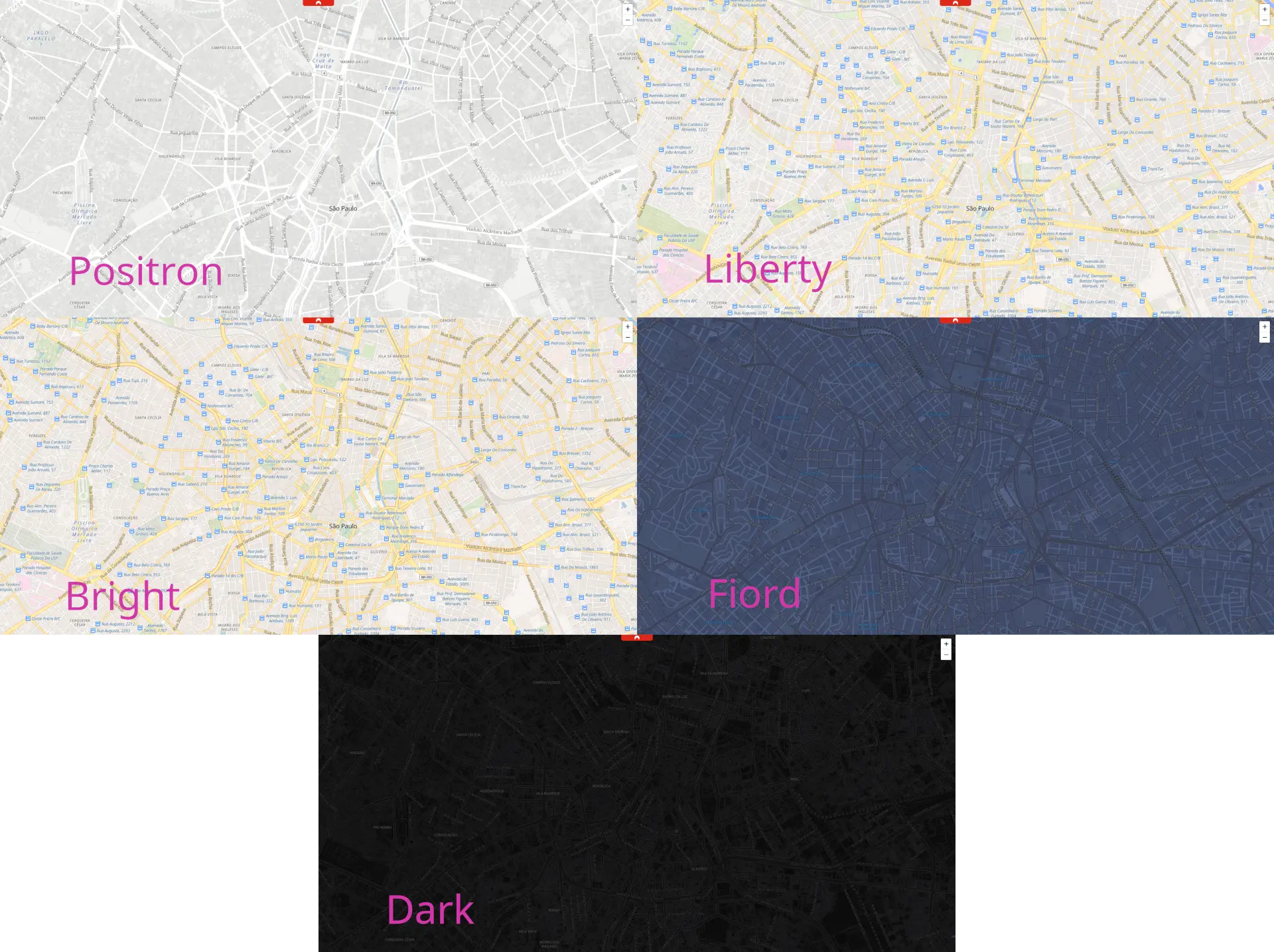
Getting the server running is the easy part for the geeky. Making the maps look good requires a different skill set, a basic knowledge of the elements involved, a good idea of what you want to see, and plenty of repetitions.
If any of the preconditions doesn't ring true, you're far better off starting from someone else's creation, and maybe tweak it a little.
OpenFreeMap provides five battle-tested styles: dark, bright, fiord, liberty, and positron. They follow the Mapbox/MapLibre style specification (version 8) and work directly with tileserver-gl.
One annoying detail: styles reference their data sources by URL, so you need to rewrite these to match your tileserver-gl config. OpenFreeMap styles expect a source like https://tiles.openfreemap.org/planet, but your local server needs mbtiles://planet.mbtiles or pmtiles://planet.pmtiles.
The style dependency chain is: style → source → glyphs → sprites. Each link can fail independently, and the error messages are unhelpful. Fonts default to Noto Sans (same as tileserver-gl's built-in fonts, so no extra config needed). Sprites come from external URLs like https://maputnik.github.io/osm-liberty/sprites/osm-liberty. If either is misconfigured, you get maps without labels or icons — and no error.
If you really want to craft your map style, Maputnik is indispensable. It's a visual editor that lets you modify styles interactively. Start with an OpenFreeMap style, tweak colors and label sizes, export JSON, done.
Putting It Behind Nginx
Tileserver-gl is not designed to face the internet directly. You need a reverse proxy.
My setup uses Docker Compose with tileserver-gl + nginx + Let's Encrypt (certbot). The key insight is that dev and prod topologies should differ:
In development: The main application's nginx handles the map subdomain via proxy_pass to the map server on a different machine. The map server's own nginx doesn't need to handle HTTPS.
In production: The map server's nginx handles HTTPS independently with its own certificate. The main application doesn't touch map traffic at all.
The compose file mounts everything read-only: planet file, config, styles directory. Nginx handles TLS termination, caching headers, and health checks.
I have a simple configuration-based system called nginx-quick-relay that puts insecure connections behind nginx+Let's Encrypt HTTPS with minimal config. It can save headaches if you're deploying multiple services that each need TLS.
The Where Question
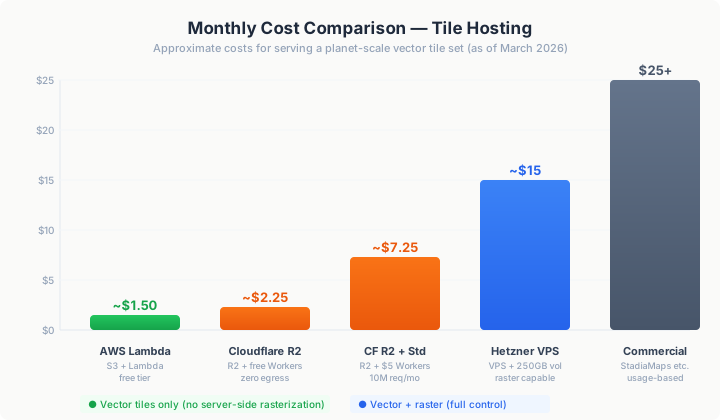
A planet file is 100–150GB. Where you store and serve it determines your monthly bill.
The $1.50/Month AWS Lambda Path
ZeLonewolf's approach: use Planetiler to generate PMTiles, store on S3, serve via Lambda for HTTP range requests. Total cost: ~$1.50/month within the free tier. Beyond the free tier (1TB egress, first 100GB/month free across AWS), data transfer costs ~$0.09/GB, and Lambda invocations go for $0.20 per million, plus execution time, which varies heavily depending on memory reserved for the Lambda and execution time.
The Cloudflare Zero-Egress Path
Cloudflare R2 has zero egress fees. Storage costs $0.015/GB-month — about $2.25/month for a planet file. Cloudflare Workers handle the serving logic: the free tier gives you 100K requests/day (~3M/month), which supports roughly 30K users at 100 tiles per user. The Standard plan ($5/month) includes 10M requests/month — good for ~100K users. Extra requests are $0.30/1M.
One warning: OpenFreeMap reports terrible latency for HTTP range requests on Cloudflare. This specifically impacts PMTiles serving, where each tile view requires multiple range requests.
The VPS Path
Using a virtual server is the most flexible way to serve maps, but it comes at larger fixed costs and deployment complexity. On the plus side, you retain full control and have predictable costs.
A Hetzner volume at 0.044 EUR/GB-month means 250GB = 11 EUR/month, 500GB = 22 EUR/month. Add a small VPS for tileserver-gl and you're at ~15–25 EUR/month total. The advantage: you can serve raster tiles, which the serverless paths can't do.
Other providers also work well, but expect hosting costs to scale up considerably.
Pre-Rendering
Pre-rendering tiles is also possible with the right tools, but the storage needs and processing times are daunting, not to mention the added complexity.
CDN Comparison for Protomaps
Protomaps has a deployment guide for CDNs that covers the specifics of each provider.
The key insight: PMTiles + CDN is the cheapest architecture for vector tiles. But if you need raster tiles, you need a server with a renderer — and that means Hetzner or similar.
Lofty Goals and Grounding: Multi-Tenant Access Control
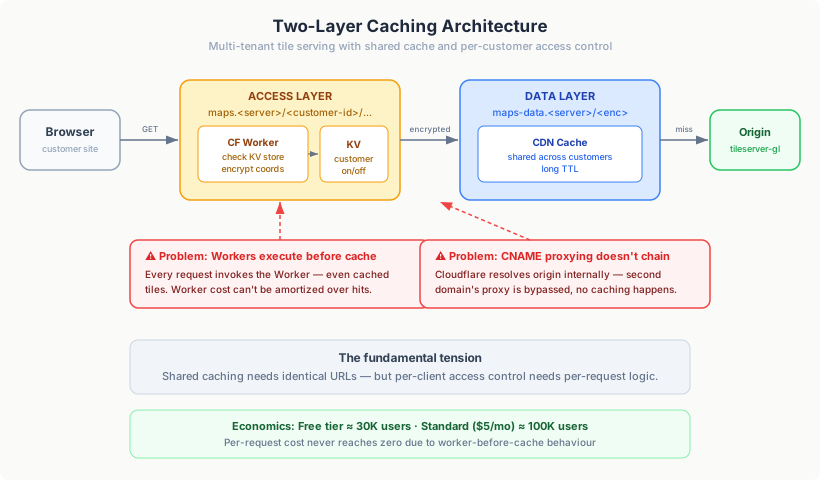
One of the most interesting problems I worked on in this deep dive was this: how do you serve maps to multiple customers of my SaaS product, while making it possible to individually enable or disable map access for each of them?
I wanted to achieve this while also maximising the caching of tiles, so that requests from multiple tenants would hit the map server only once. This requirement makes achieving customer separation quite a bit harder: you can no longer just point everyone to the same URL, as that would break caching. The problem can of course be solved with ... just another level of indirection!
The working idea was to be able to serve massive amounts of maps — in a limited number of styles — reducing as much as possible the load on the map server itself.
The architecture I designed works in two layers:
- Access layer:
maps.<map-server>/<customer-id>/style/.../z/x/y— a worker checks customer-id against a KV store. Disabled? Return 403. Enabled? Encrypt the tile coordinates in a customer-independent way and retrieve the tile from the data layer; the response can be cached for speed with a lowish time-to-live, depending on cache storage costs; this layer can also resolve CORS, limiting data access to trusted URLs. - Data layer:
maps-data.<map-server>/<encrypted-coords>— accesses the map server, decrypts the coords, and returns the actual tile; the result is cached with a longer time-to-live. Different customer-ids share the same cached tiles because the encrypted coordinates are identical.
Elegant enough — in theory.
The Cloudflare Debacle
I first looked into implementing it using Cloudflare:
- Cloudflare Workers would implement the Access Layer and request cached data from the Data Layer
- the result of the Cloudflare Workers would be cached
- Data Layer cache misses would hit the origin server
However, I hit three walls.
CNAME proxying doesn't chain. I expected Cloudflare requests on maps. would be able to access cached data for maps-data.. Instead, Cloudflare resolves the origin server internally, so the second domain's Cloudflare proxy is bypassed and no caching happens.
Workers execute before cache. The Workers script (and the KV GET) occur before cache. This means every request invokes the Worker, even for tiles that are already cached. You can't amortize the Worker cost over cache hits.
The economics are awkward, not terrible. The free tier (100K/day ≈ 3M/month) supports ~30K users at 100 tiles/user — decent for small scale. Standard plan ($5/month, 10M requests) handles ~100K users. Extra requests cost $0.30/1M ($3 per 10M additional). It scales, but the per-request cost never goes to zero because of the worker-before-cache behaviour.
What Now?
Multiple alternatives are possible: placing a different CDN in front of Cloudflare, for example, but that adds yet another layer of indirection; implementing a CDN in front of an origin server for the Access Layer, but that would require ping-ponging requests to and from caches; hosting my own internal cache for tiles and only fronting the Access Layer with a CDN, but that would consume considerable extra resources.
All in all, no acceptable solution was simple enough to implement at this stage.
Simple CDN caching of per-tenant routes, if somewhat unsatisfying, is the most cost-effective solution at this stage.
The lesson: Multi-tenant tile serving with per-client access control is a somewhat difficult problem at the CDN layer. The fundamental tension is that you want shared caching (one copy of each tile) but per-client access control (which requires per-request logic). For most use cases, simple alternatives work: API keys validated at the origin server and separate per-client routes come to mind.
What I'd Do Differently
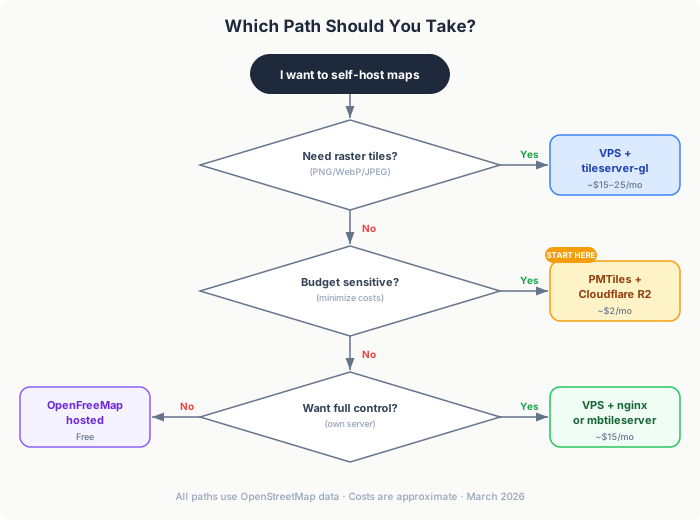
After this deep dive, here are a few recommendations for someone starting from scratch:
Start with Protomaps PMTiles + Cloudflare R2. It's the simplest possible deployment: one file on cloud storage, zero egress costs, no server to manage. If all you need is vector tiles — and you're not daunted by potentially large latency — you're done.
Use tileserver-gl only if you need raster tiles. If your use case requires PNG/WebP tiles (mobile apps, embedded maps, Leaflet without extra JS), then tileserver-gl on a Hetzner VPS is the way to go. Otherwise, skip the renderer entirely.
Don't over-engineer CDN access control. If you're building a multi-tenant platform, start with API keys at the origin server and a public CDN. It's simpler, cheaper, and works for 99% of use cases. The two-layer cache architecture is satisfying but operationally questionable.
Budget for storage early. Planet files are ~120–150GB. Storage is a recurring cost — Hetzner volumes, S3 buckets, R2 — and it's easy to underestimate.
Read source code, not documentation. The OSM ecosystem has excellent software and less-than-amazing docs. Tileserver-gl's config is best understood by running it in verbose mode. OpenFreeMap's styles are best understood by reading the JSON. Accept this and plan accordingly.
Start with OpenFreeMap styles. They work, they look good, and they're well-maintained. Customize with Maputnik later if you need to.
Open Questions
A few open questions I haven't had time to really go into:
- Pre-rasterizing the entire planet: Is it feasible? What are the storage requirements for pre-rendered tiles at zoom 14+?
- CDN caching effectiveness: At zoom 14+, the tile space is enormous. What percentage of tiles actually get cache hits?
- Optimal format: PMTiles for CDN, mbtiles for servers, btrfs for raw speed — is there a clear winner for high-volume serving?
The OSM self-hosting ecosystem is mature enough that the hard part isn't building it — it's navigating the choices. I hope this field report makes those choices a little clearer.